

Complete Guide to Restaurant Management Software
Restaurant management software is one system that runs the operational loop of a restaurant — the menu, the orders, the kitchen, the tables, the bill and the numbers afterwards — instead of five disconnected tools passing paper between them. If you remember one thing from this guide, make it this: the parts are not a shopping list, they are a single data flow, and the systems that feel effortless in service are the ones where that flow never breaks.
The visit is the unit of everything
Most software marketing lists features. A restaurant runs on visits: a party arrives (walk-in, waitlist, reservation, or straight from a table QR scan), waits or is seated, orders, gets served, pays, and leaves — freeing the table for the next party. Every feature you will ever evaluate is a stage of that lifecycle:
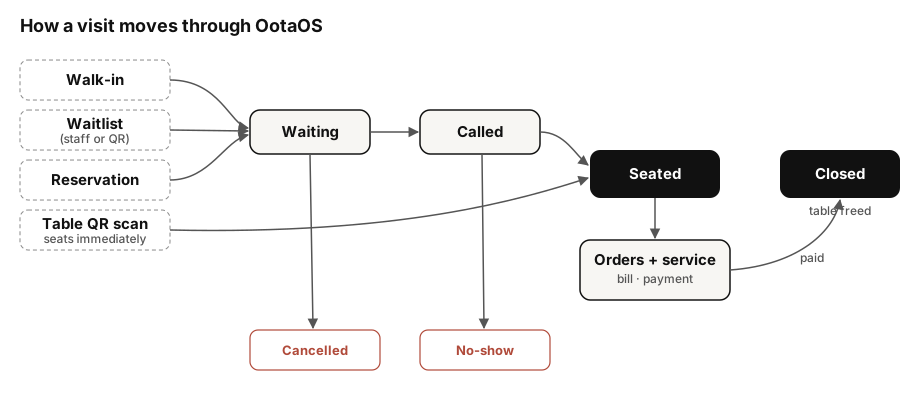
This is the actual state machine OotaOS runs in production — a visit enters from one of five sources and every downstream screen (floor view, kitchen, billing, reports) reads the same record. When you evaluate any system, walk this loop end to end and watch for the seams: does the waitlist know about the reservation book? Does the kitchen know a table's second round belongs to the same bill? Does the report know a discount was applied at payment?
What the core modules must actually do
Menu. Not just names and prices: variants (half/full, sizes) and modifier groups (toppings, spice level) that flow into the kitchen ticket exactly as the diner chose them. A menu that can't express your real menu forces staff back to verbal instructions, and verbal instructions are where wrong orders come from.
Ordering. Diners ordering from their own phones via a table QR, alongside staff-taken orders, landing in one queue. The test: change a menu price and scan the QR — the phone must show the new price immediately, because the QR opens the live menu, not a PDF snapshot.
Kitchen display. Orders appear the moment they are placed, and each dish moves through its own states so a slow dish never hides a ready one. (The KDS guide covers the state model in depth.)
Tables, waitlist and reservations. One floor picture. A party on the waitlist can pre-order while waiting; a reservation can carry a deposit; a seated table shows its live order status to the floor staff.
Money. Bills that survive reality: items added mid-meal, a dish sent back, a discount or coupon at the end. Payment rails differ by country — UPI dominates pay-at-table in India while card terminals dominate elsewhere — so check that the system treats your country's rails as first-class, not as an afterthought. Card handling should ride on a certified processor rather than the restaurant's own systems ever touching card data (that is what the PCI standards regime exists for).
Reports. Every stage above writes data; reports are only as good as that flow. If ordering, billing and feedback live in separate tools, "how did Friday actually go?" becomes an export-and-spreadsheet evening. In one system, it is a page with a CSV button.
A worked example
A 16-table casual-dining restaurant on a Friday: the waitlist holds six parties, two of them pre-ordering starters from their phones while they wait. A party is seated from the waitlist — their pre-order fires to the kitchen as they sit. Mid-meal they add two mains from the table QR; the additions join the same bill. At payment, a coupon applies, the receipt goes out as a PDF, and a feedback prompt follows. Nothing was re-keyed anywhere. Every one of those steps is a place where separate tools would have needed a human bridge.
How to choose: a short decision table
| If you are… | Prioritise | Be wary of |
|---|---|---|
| A small eatery, mostly counter service | Simple ordering + billing, fast setup | Paying for floor/reservation modules you won't use |
| Full-service dining | Visit lifecycle depth: waitlist ↔ reservations ↔ tables ↔ kitchen | Systems where QR ordering is a bolted-on PDF menu |
| Multi-channel (dine-in + delivery apps) | One kitchen queue for all sources | Tablet farms — one screen per delivery app |
| Migrating from another system | A real migration path for menu + history | "Just re-enter everything" onboarding |
The OotaOS perspective
We build OotaOS around the visit lifecycle above, and this guide reflects what our own system ships today — menu with variants and modifiers, QR ordering, a per-item kitchen display, unified tables/waitlist/reservations, discounts and coupons, PDF receipts with feedback, reports with CSV export, and a data migration wizard for moving in from an existing system. Where something is country-specific or not yet shipped, our editorial methodology requires us to say so rather than round up.
What this guide doesn't cover
Pricing strategy, staff scheduling and accounting integrations are real concerns we haven't covered here — a management system feeds your accountant data but doesn't replace them. Payroll and HR are separate categories.
Sources
- NPCI — Unified Payments Interface (UPI) product overview (checked 25 September 2026)
- PCI Security Standards Council — standards overview (checked 25 September 2026)