

Complete Guide to Restaurant Kitchen Display Systems
A kitchen display system (KDS) replaces the printer and the ticket rail with a screen: orders appear the moment they are placed, the kitchen works them in order, and every status change is visible to everyone who needs it — without anyone walking to the pass to ask. The interesting part is not the screen. It is the state model underneath, and that is where systems differ most.
Per-ticket vs per-item: the decision that matters
A printer thinks in tickets: one slip, one order, done when the slip is spiked. A basic KDS digitizes that same model — the whole ticket is "preparing", then the whole ticket is "ready". The problem is that a real order isn't one thing: a salad takes four minutes, the grilled main takes fourteen. Under per-ticket tracking, either the salad wilts under the lamp waiting for the grill, or the expo has no visibility into which parts of the ticket are actually done.
Per-item tracking gives every dish its own tiny lifecycle — pending → preparing → ready — so each station advances its own dishes and the pass sees the true state of every table at a glance:
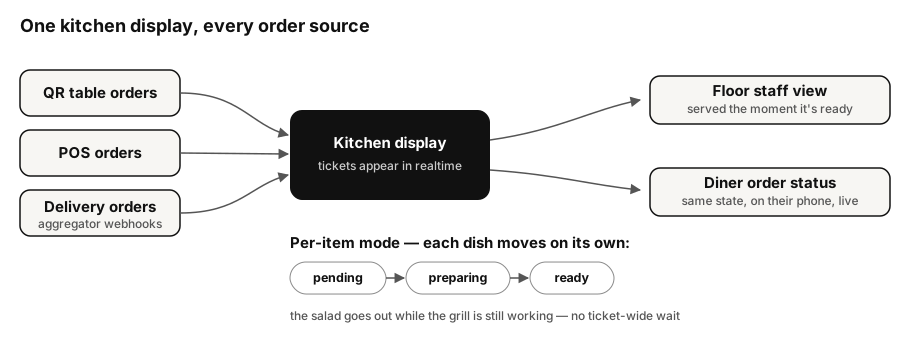
This is the model OotaOS runs: the kitchen display supports per-item states natively, and courses pace themselves off real dish states instead of a cook's shouted estimate.
One screen, every order source
The second thing to demand: all orders on one queue. Dine-in orders from table QRs, staff-entered POS orders, and delivery-platform orders arriving via the aggregators' webhooks should land on the same display, in the same format, ordered by time and urgency. The failure mode this prevents has a familiar shape: a shelf of tablets, one per delivery app, each chirping for attention while the kitchen's real queue lives somewhere else. In OotaOS, delivery orders flow into the same kitchen queue as everything else.
Status must flow back out
A KDS that only receives is half a system. Every state change the kitchen makes should propagate instantly — over persistent realtime connections (the mechanism browsers standardise as WebSockets) — to two audiences:
- Floor staff, who see "ready" the second it happens and serve while it's hot, instead of doing laps past the pass.
- The diner, whose own order page (for QR orders) shows the same received/preparing/ready progression the kitchen is setting. Most "where's my food?" interruptions are really "nobody told me anything" — the status page answers before the question is asked.
Evaluating a KDS: a short checklist
| Check | How to test it |
|---|---|
| Per-item states | Order a fast and a slow dish together; can the kitchen mark just one ready? |
| Multi-source queue | Place a QR order and a staff order; do they appear on the same screen, same format? |
| Latency | Place an order and count seconds to the kitchen screen — it should feel instant |
| Status fan-out | Mark a dish ready; does the floor view AND the diner's page change without a refresh? |
| Peak behaviour | What does the screen look like with 20 open tickets? Sorting and colour must still communicate |
The OotaOS perspective
The diagram above is our production architecture, not an aspiration: per-item kitchen states, one queue fed by QR ordering, the POS and delivery webhooks, and realtime fan-out of every change to the floor and the diner. Per our editorial methodology, this guide references only shipped behaviour.
What this guide doesn't cover
Kitchen hardware (screen mounting, bump bars, heatproofing) and recipe/prep management. A KDS orchestrates orders; what happens inside each dish is your kitchen's craft.
Sources
- MDN — The WebSocket API (realtime push over persistent connections) (checked 25 September 2026)