

Complete Guide to Restaurant QR Ordering
QR ordering means a diner scans a code on the table with their phone camera and orders from a live menu — no app install, no waiter round-trip for the order itself. The concept is simple; the difference between systems is everything that happens after the scan. This guide walks the whole path, and gives you one test that instantly separates real ordering systems from decorated PDF menus.
The one test
Scan the QR, then ask the owner to change a price and scan again. A real system shows the new price immediately, because the code opens the restaurant's live menu for that specific table. A PDF-behind-a-QR shows the old price until someone re-exports and re-uploads a file. Everything else in this guide follows from that difference.
The full path, from sticker to served
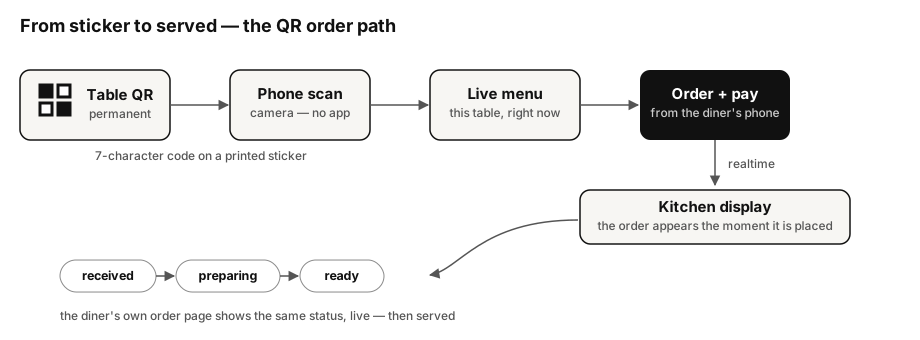
Four properties of this path are worth checking in any system:
- The code is permanent. In OotaOS every table QR is a short permanent code on a printed sticker — the sticker outlives menu changes, price changes and even a full menu redesign, because the code identifies the table, and the menu is resolved live at scan time. If your codes change when the menu does, you will be re-printing stickers forever.
- The order lands in the kitchen instantly. Not in an inbox, not on a tablet someone must check — on the kitchen display, the moment it is placed.
- Status flows back. The diner who ordered from their phone watches the same states the kitchen sets — received, preparing, ready — on their own order page, and can cancel within the window you allow. Fewer "where's my food?" interruptions is most of the labour saving.
- Ordering is not the only signal. A diner should be able to call a waiter or ask for water from the same page — in OotaOS these are service requests that appear to the floor staff like any other realtime event.
Guest identity without an app
The classic objection: "my regulars don't want to sign up for anything." Right — they shouldn't. In OotaOS a diner verifies an email once and is remembered on that device with a secure long-lived session, so a returning diner orders without re-verifying, and no app or password exists anywhere in the flow. When evaluating systems, be suspicious of anything that demands an app download or a phone-number signup before a guest can see the menu.
Pay at the table
QR ordering pairs naturally with paying from the phone. In India that means UPI — the diner pays from their own banking app in seconds (see NPCI's UPI overview); in card-first markets, a hosted card checkout. One caution from the floor: pay-at-table works best when the bill is already correct — which loops back to ordering and billing living in one system.
Where QR ordering fits — and where it doesn't
Waiting parties are the underused case: a party on the waitlist can browse and pre-order from their phone before they sit, so their starters fire the moment they are seated. That converts dead queue time into kitchen lead time — and shorter visits mean more turns, which you can put numbers on with our table turnover calculator. At the other end: fine dining built on tableside conversation, or a menu that genuinely needs explaining, may want staff-taken orders with QR reserved for the drinks reorder and the bill. It is an operating decision per restaurant, not an ideology — good software supports both at once.
The OotaOS perspective
Everything above is shipped OotaOS behaviour: permanent table QR codes with live resolution, phone ordering, the diner-visible status lifecycle with cancellation, service requests, email-verified returning-guest identity, and waitlist pre-ordering. Per our editorial methodology, where something here is plan-gated or country-specific, the product pages say so — this guide claims nothing that isn't live.
What this guide doesn't cover
Printing logistics for the stickers themselves, and delivery-platform QR menus (a different problem — that's about aggregator listings, not table service).
Sources
- NPCI — Unified Payments Interface (UPI) product overview (checked 25 September 2026)